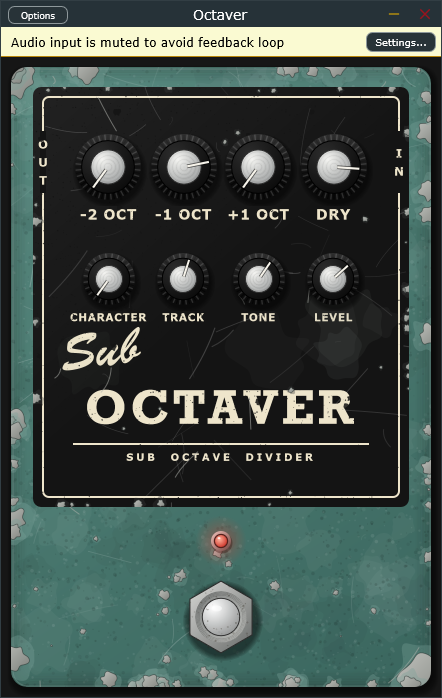
Octaver is a free sub-octave divider plugin from Beer & Guitars, modelled on the classic analogue octave pedals. Plug in, dial in some low end under your riffs, and stomp it on and off like the real thing.
What it does
Octaver follows the note you play and adds voices one and two octaves below it, plus one above. Each voice has its own level knob, so you can blend a subtle low-end thickener or go full synth-bass.
- -2 OCT, -1 OCT, +1 OCT, DRY: the level of each voice and of your clean signal.
- Character: moves the sub voices from smooth to a square-wave, fuzzy edge.
- Track: sets the tracking filter (60 Hz to 1.5 kHz) so the octaves lock on to the notes you play.
- Tone: a low-pass on the effect, from dark and thumpy to bright.
- Level: overall output (-24 to +12 dB), with a footswitch for bypass.
Like the pedals it’s based on, it works best on single notes. Play cleanly and roll your neck pickup on for the strongest tracking.
Download
Windows 64-bit, VST3 and standalone app. Free.
How to install
- Unzip the download.
- Plugin: from
Octaver-VST3-win64.zip, copy theOctaver.vst3folder intoC:\Program Files\Common Files\VST3, then rescan plugins in your DAW. - Standalone: from
Octaver-Standalone-win64.zip, runOctaver.exe, then open Options → Audio settings to choose your interface. Input starts muted to avoid feedback; unmute it once you’re on headphones or have your guitar plugged in.
Windows may show a “Windows protected your PC” warning the first time, because the app isn’t code-signed. Click More info, then Run anyway.