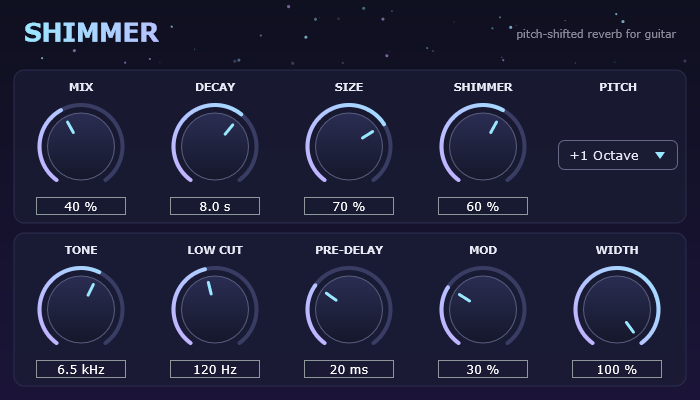
Shimmer Verb is a free shimmer reverb plugin from Beer & Guitars. Play a chord and it blooms into a huge, pitch-shifted wash that climbs an octave with every repeat, the angelic ambient sound made famous by big-box studio reverbs and boutique pedals.
What it does
Your guitar goes into a lush stereo reverb. The reverb tail is pitched up and fed back in, so each repeat rises higher and the sound swells into a shimmering pad. Turn Shimmer down to zero and it’s a clean, modulated hall reverb.
- Mix: dry/wet blend. Your dry signal stays at full level up to 50%.
- Decay: reverb time, from 0.5 to 20 seconds.
- Size: from a small room to a cathedral.
- Shimmer: how much pitch-shifted sound feeds back. 0 gives a plain reverb.
- Pitch: the shimmer interval: +1 octave, +5th, +octave and 5th, +2 octaves, +4th or -1 octave.
- Tone: darkens or brightens the tail.
- Low Cut: keeps low strings from muddying the reverb.
- Pre-Delay, Mod, Width: gap before the reverb, chorus-like movement and stereo spread.
Put it after your drive and amp sim. For ambient swells, try Mix 45%, Decay 10 s, Shimmer 70% and Low Cut 200 Hz. For a subtle sparkle, try Shimmer 30%, Decay 4 s and Mix 25%.
Download
Windows 64-bit, VST3 and standalone app. Free.
How to install
- Unzip the download.
- Plugin: from
ShimmerVerb-VST3-win64.zip, copy theShimmer Verb.vst3folder intoC:\Program Files\Common Files\VST3, then rescan plugins in your DAW. - Standalone: from
ShimmerVerb-Standalone-win64.zip, runShimmer Verb.exe, then open Options → Audio settings to choose your interface. Input starts muted to avoid feedback; unmute it once you’re on headphones or have your guitar plugged in.
Windows may show a “Windows protected your PC” warning the first time, because the app isn’t code-signed. Click More info, then Run anyway.